
目录
# 问题阐述
下载的开源项目,在 npm/yarn install,报错 gyp ERR! find Python 。
gyp ERR! find Python
gyp ERR! find Python Python is not set from command line or npm configuration
gyp ERR! find Python Python is not set from environment variable PYTHON
gyp ERR! find Python checking if "python" can be used
gyp ERR! find Python - "python" is not in PATH or produced an error
gyp ERR! find Python checking if "python2" can be used
gyp ERR! find Python - "python2" is not in PATH or produced an error
gyp ERR! find Python checking if "python3" can be used
gyp ERR! find Python - "python3" is not in PATH or produced an error
gyp ERR! find Python checking if the py launcher can be used to find Python 2
gyp ERR! find Python - "py.exe" is not in PATH or produced an error
gyp ERR! find Python checking if Python is C:\Python27\python.exe
gyp ERR! find Python - "C:\Python27\python.exe" could not be run
gyp ERR! find Python checking if Python is C:\Python37\python.exe
gyp ERR! find Python - "C:\Python37\python.exe" could not be run
gyp ERR! find Python
gyp ERR! find Python **********************************************************
gyp ERR! find Python You need to install the latest version of Python.
gyp ERR! find Python Node-gyp should be able to find and use Python. If not,
gyp ERR! find Python you can try one of the following options:
gyp ERR! find Python - Use the switch --python="C:\Path\To\python.exe"
gyp ERR! find Python   (accepted by both node-gyp and npm)
gyp ERR! find Python - Set the environment variable PYTHON
gyp ERR! find Python - Set the npm configuration variable python:
gyp ERR! find Python   npm config set python "C:\Path\To\python.exe"
gyp ERR! find Python For more information consult the documentation at:
gyp ERR! find Python https://github.com/nodejs/node-gyp#installation
gyp ERR! find Python **********************************************************
gyp ERR! find Python
gyp ERR! configure error
gyp ERR! stack Error: Could not find any Python installation to use
gyp ERR! stack     at PythonFinder.fail (D:\java\nvm\v12.16.2\node_modules\npm\node_modules\node-gyp\lib\find-python.js:307:47)
gyp ERR! stack     at PythonFinder.runChecks (D:\java\nvm\v12.16.2\node_modules\npm\node_modules\node-gyp\lib\find-python.js:136:21)
gyp ERR! stack     at PythonFinder.<anonymous> (D:\java\nvm\v12.16.2\node_modules\npm\node_modules\node-gyp\lib\find-python.js:225:16)
gyp ERR! stack     at PythonFinder.execFileCallback (D:\java\nvm\v12.16.2\node_modules\npm\node_modules\node-gyp\lib\find-python.js:271:16)
gyp ERR! stack     at exithandler (child_process.js:310:5)
gyp ERR! stack     at ChildProcess.errorhandler (child_process.js:322:5)
gyp ERR! stack     at ChildProcess.emit (events.js:310:20)
gyp ERR! stack     at Process.ChildProcess._handle.onexit (internal/child_process.js:273:12)
gyp ERR! stack     at onErrorNT (internal/child_process.js:469:16)
gyp ERR! stack     at processTicksAndRejections (internal/process/task_queues.js:84:21)
gyp ERR! System Windows_NT 6.1.7601
gyp ERR! command "D:\\java\\nodejs\\node.exe" "D:\\java\\nvm\\v12.16.2\\node_modules\\npm\\node_modules\\node-gyp\\bin\\node-gyp.js" "rebuild"
gyp ERR! cwd D:\ideaWork\SpringBlade\Sword\node_modules\node-pty
gyp ERR! node -v v12.16.2
gyp ERR! node-gyp -v v5.1.0
gyp ERR! not ok
# 解决方案如下
# 方案一(建议使用)
下载 python2.7 安装即可:https://www.python.org/download/releases/2.7/ (opens new window)
ps:安装完成以后要添加环境变量。
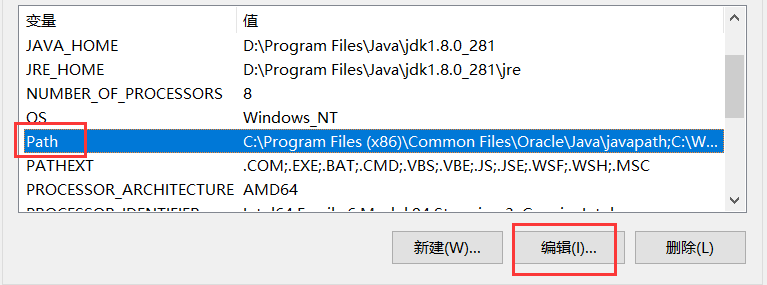 编辑环境变量
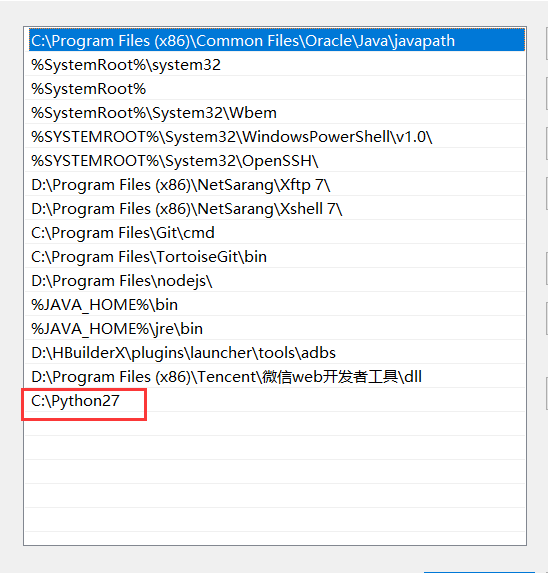 安装完成以后关闭 cmd ,再次重新执行
 npm/yarn install。
# 方案二
管理员权限打开执行 cmd,执行以下命令:
npm install --global --production windows-build-tools